 Nederlands
  English
 中文 (中国)
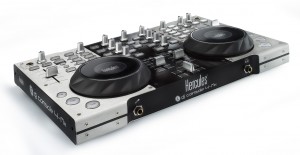
DJ Console 4-Mx
Productnummer 4780653 4780742 4780808 4780816 4781023 4782027
Waarschuwing
If your computer PC/Mac with USB 3 ports does not detect your DJ console:
1) Test your DJ Console on a PC with either Windows 7 or Windows 8.0, or with not any USB 3 port.
Open the Hercules DJ Control Panel, go to the About tab and check the Firmware version.
To work on computers with a USB 3 port, the firmware version must end with:
- 16 on DJ Console Mk2,
- 32 on DJ Console Rmx,
- 22 on DJ Console Mk4,
- 18 on DJ 4Set,
- 16 on DJ Console 4-Mx.
2) Try using a shorter, well-shielded USB 2 cable (a maximum of 3.3 feet/1 meter in length)
3) Connect a USB 3 hub powered by a power supply between your DJ Console and the USB port of your computer.
For more information, please refer to the knowledge base article:
Windows https://support.hercules.cn/en/kb/1004-en/
macOS https://support.hercules.cn/en/kb/1006-en/
1) Test your DJ Console on a PC with either Windows 7 or Windows 8.0, or with not any USB 3 port.
Open the Hercules DJ Control Panel, go to the About tab and check the Firmware version.
To work on computers with a USB 3 port, the firmware version must end with:
- 16 on DJ Console Mk2,
- 32 on DJ Console Rmx,
- 22 on DJ Console Mk4,
- 18 on DJ 4Set,
- 16 on DJ Console 4-Mx.
2) Try using a shorter, well-shielded USB 2 cable (a maximum of 3.3 feet/1 meter in length)
3) Connect a USB 3 hub powered by a power supply between your DJ Console and the USB port of your computer.
For more information, please refer to the knowledge base article:
Windows https://support.hercules.cn/en/kb/1004-en/
macOS https://support.hercules.cn/en/kb/1006-en/
Drivers
 HDJCSeries MAC [DJSeriesInstall 6.51s - macOS 11 (Big Sur) to macOS 15 (Sequoia)]MAC
 Release-informatie - HDJCSeries MAC [DJSeriesInstall 6.51s - macOS 11 (Big Sur) to macOS 15 (Sequoia)]
- HDJCSeries MAC® [DJSeriesInstall 6.18s - OS X 10.6 to macOS 10.15.7]MAC
-
Release-informatie - HDJCSeries MAC® [DJSeriesInstall 6.18s - OS X 10.6 to macOS 10.15.7]
 HDJCSeries PC [2016.HDJS.3 - Windows XP ]PC
-
Release-informatie - HDJCSeries PC [2016.HDJS.3 - Windows XP ]
- HDJCSeries PC [2020.HDJS.1 - Windows 7 -8.1] Asio driversPC
-
Release-informatie - HDJCSeries PC [2020.HDJS.1 - Windows 7 -8.1] Asio drivers
- HDJCSeries PC [2023.HDJS.2 - Windows 10-11] ASIO driversPC
-
Release-informatie - HDJCSeries PC [2023.HDJS.2 - Windows 10-11] ASIO drivers
Handleiding
 User Manual - DJ Console 4-Mx - NL
- VirtualDJ 7 LE / DJ Console 4-Mx - Guide - NL
- Getting Started - DJ Console 4-Mx
- Hercules DJ Series - Drivers Install MACMAC
- Hercules DJ Series - Drivers Install PCPC
- Hercules DJ Series - Installation Pilotes MACMAC
- Hercules DJ Series - Installation Pilotes PCPC
- User Manual - DJ Console 4-Mx - DE
- User Manual - DJ Console 4-Mx - EN
- User Manual - DJ Console 4-Mx - ES
- User Manual - DJ Console 4-Mx - FR
- User Manual - DJ Console 4-Mx - IT
- User Manual - DJ Console 4-Mx - PT
- User Manual - DJ Console 4-Mx - RU
- VirtualDJ 7 LE / DJ Console 4-Mx - Guide - DE
- VirtualDJ 7 LE / DJ Console 4-Mx - Guide - EN
- VirtualDJ 7 LE / DJ Console 4-Mx - Guide - ES
- VirtualDJ 7 LE / DJ Console 4-Mx - Guide - FR
- VirtualDJ 7 LE / DJ Console 4-Mx - Guide - IT
- VirtualDJ 7 LE / DJ Console 4-Mx - Guide - PT
- VirtualDJ 7 LE / DJ Console 4-Mx - Guide - RU
MIDI-mapping
 DJay Pro - DJ Console 4-Mx - MappingMAC
-
Release-informatie - DJay Pro - DJ Console 4-Mx - Mapping
- Traktor Pro 2 (v2.68 or +) - DJC 4-Mx
Tutorials
Kennis basis
 Ik kan het serienummer van VirtualDJ LE voor mijn Hercules DJ-controller niet vinden. Waar kan ik dit vinden?
- Als ik aan het DJ-en ben in Windows, dan hoor ik op willekeurige momenten krakende en knallende geluiden in de muziek, en klinkt het geluid zwaar vervormd.
- De geluidskwaliteit wordt erg slecht als ik muziekbestanden afspeel van een USB-stick.
- Mijn DJ Console Rmx, DJ Console 4-Mx of DJ 4Set deed het prima onder Mac OS 10.10 of ouder, maar wordt niet herkend op mijn MacBook met Mac OS 10.11 (El Capitan) of 10.12 (Sierra).
- Mijn DJ-controller wordt niet herkend of schakelt niet in
- Hulp en links naar DJUCED