 中文 (中国)
  English
App: Streamlabs
How to connect on Stream Control
1. In the Streamlabs Desktop app, go to Settings > Remote Control
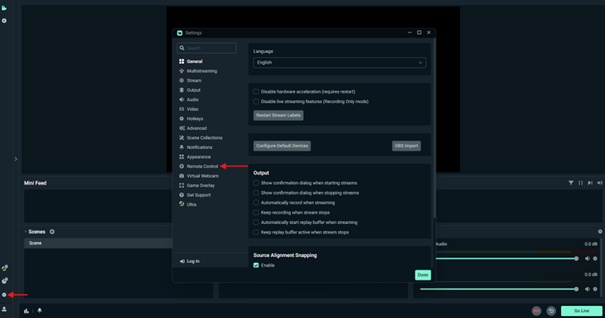
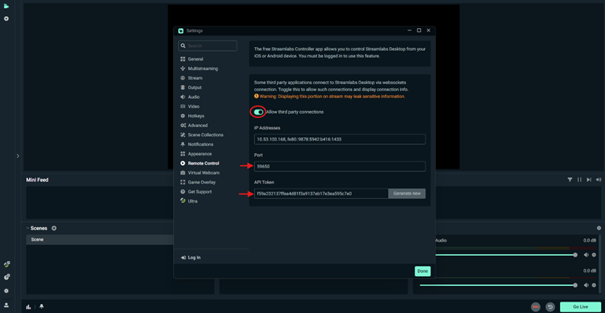
2. Make sure “Allow third party connections” is checked.
3. Copy and paste the Port and API Token into the Streamlabs plugin settings in Stream Control.
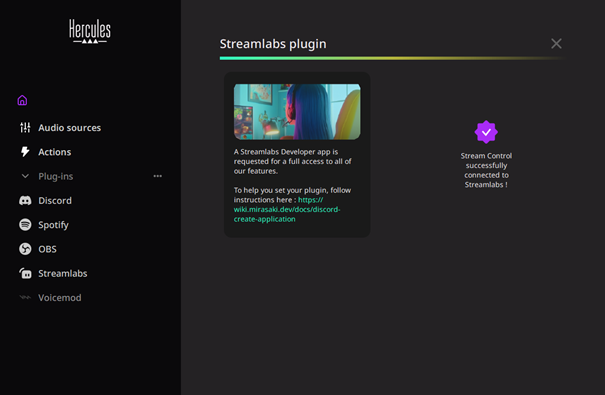
4. A purple icon will appear when the connection is successful.
Streamlabs features available on Stream Control
Once Stream control is successfully connected to Streamlabs, you will be able to:
- Scene ON / OFF – Action
- Toggle recording – Action
- Start / Stop streaming – Action
- Audio Source Management – Audio Level (Stream 100 only)