 English
 中文 (中国)

Product: DJControl T10
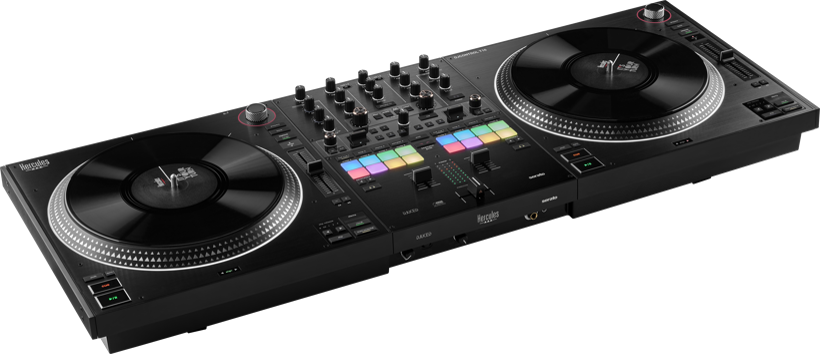
Operating systems: Windows, mac OS, iOS
Contents:
1. System Connection and Power
5. Motorized Platters and Belt Drive
1. System Connection and Power
1.1. USB port, USB type and version, USB HUB
Can I connect DJControl T10 to a computer USB type A port?
Yes, you can connect DJControl T10 to an USB port type A, and in this regard, you may use:
either a USB-C (female) to USB-A (male) adapter, and connect your DJControl T10 cable to this adapter,
or a USB-C to USB-A cable, and connect this cable directly to DJControl T10, instead of the USB-C cable included,
or a USB-hub with a USB-C input to connect DJControl T10 and a USB-A output to connect to the computer.
Can I connect DJControl T10 to a USB hub wihich has no power adapter?
Yes, DJControl T10 has its own power supply so it is less dependent on the USB-bus power DJ controllers powered by the USB bus.
Can I connect DJControl T10 to a USB 2 port?
Yes, DJControl T10 can operate on USB 2 (High speed), it does not need USB 3 (Super speed).
1.2. iOS: iPhone / iPad
Can I connect DJControl T10 to an iPhone or an iPad?
Yes, you can use DJControl T10 with an iPhone or an iPad with Serato DJ for iOS: you must first install Serato DJ for iOS on your iPhone/iPad and make sure it is supported.
If your iOS host (iPhone or iPad) has a Lightning port, you may use a USB-C to Lightning cable, as Apple muq93am cable, and connect the USB-C side to a USB port on DJControl T10, and the Lightning port to the iPhone or iPad.
If your iOS host (iPhone or iPad) has a Thunderbolt port, you may use a USB-C to USB-C cable, as the cable included with DJControl T10,
or a cable as Apple mw493am cable, and connect 1 side to the DJ controller, and the other side to the iPhone/iPad.
1.3. Power Supply
Can DJControl T10 operate without power adapter, powered by the USB-C cable of the computer?
No, DJControl T10 cannot operate without its power adapter.
If I forget my DJControl T10 power adapter before a performance, how can I replace it fast?
There is a door below DJControl T10, if you open it, you find a USB-C to DC barrel adapter: if you have a strong USB-C power adapter, as 60 Watts or higher, you may connect it to the USB-C to DC barrel adapter, to replace the power supply. We find it works with Apple MacBook Pro power adapter in USB-C. But do not use small USB-C power supply as 10- or 20-Watt adapters, they do not deliver enough power.
How to connect DJControl T10 to an iPad/iPhone and deliver power the iPad/iPhone?
If the iPad/iPhone has a thunderbolt (USB-C format) port, then to deliver power to the iPhone/iPad while DJControl T10 controls Serato DJ for iOS in the iPhone/iPad, you may:
use a USB-C hub which has a Power Delivery port (PD), as Belkin USB-C to 4-port USB-C hub AVC018btBK. You connect the hub USB-C output to the iPhone/iPad, the power supply of the iPhone/iPad to the Power Delivery port, and DJControl T10 USB-C cable to one of the 3 free ports of the USB-hub,
or use a 2-port USB-C adapter, as Belkin Connect USB-C to Data + Charge adapter hr862zm. You connect the adapter USB-C end to the iPhone/iPad, the power supply of the iPhone/iPad to the USB-C labeled ""100W PD Input"", and DJControl T10 USB-C cable to the other USB-C port.
2. Audio Connection
2.1. Multiple Speakers
Can I connect at the same time speakers on the XLR master outputs and on the RCA master outputs?
Yes, you can, it plays the same signal, but as the XLR Master Outputs are designed for public address speakers and as the RCA master outputs are designed for consumer speakers, the output levels are very different, + 28 dBu on the XLR master outs, +7 dBu on the RCA master outs, so if you want to play the master output on 4 public address speakers, you either need to add a gain on the RCA outputs, or you may recycle the booth out for public address.
2.2. Microphone input
Can I connect the receiver of a wireless microphone?
Yes, you can connect the receiver of a wireless microphone but make sure of its output setting: some receivers output may be in microphone level (plug it in DJControl T10 microphone input), some may be in line level (plug it in DJControl T10 dual RCA Aux input).
As the microphone input connector is a combo, XLR + 1/4'', is the gain the same on both XLR and 1/4" input?
Yes, the mic input is balanced both in XLR and in 1/4'', and the gain is exactly the same on both XLR and 1/4".
Can I use a microphone with phantom power?
No, the microphone input on DJControl T10 is made for dynamic microphones, they are not microphones with phantom power.
2.3. Public Address system
Can I connect directly DJControl T10 master output to a Public Address (PA) system or should the master output go through a mixer first?
You can connect DJControl T10 master output directly to a Public Address system if you connect the dual XLR output, whose level is strong enough for PA systems +28dBu.
If you want to go through a mixer, you may use either T10 dual XLR output or dual RCA output, depending on the type of connection on the mixer, but the output level is not the same (+28dBu on the dual XLR output, +7dBu on the dual RCA output).
Can I connect the booth output to PA speakers?
You can also connect the booth output, in 2 x 1/4'' balance format, to PA systems, the output level is +28dBu as the master output.
3. Compatibility
3.1. Compatible Software: Windows/macOS
Which Windows/macOS DJ apps support DJControl T10?
DJControl T10 is compatible with its 2 inlcuded DJ apps, Serato DJ Pro and DJUCED Pro.
It is also compatible with djay Pro and VirtualDJ Pro, but a paid licence is needed to use these 2 apps.
3.2. iOS Compatibility
Which iOS DJ apps support DJControl T10?
DJControl T10 is compatible with Serato DJ iOS, as Serato licence is included in the controller.
It is also compatible with djay Pro iOS, but a paid icence is needed to use DJControl T10 in djay Pro iOS.
Does Serato DJ for iOS provide the same feature as Serato DJ Pro with DJControl T10?
Serato DJ for iOS in free mode is feature-limited = 4 hot cue, no slip mode, few fx, no record...
If you use DJControl T10 with Serato DJ for iOS in free mode, its features are limited: to get a similar level of features as Serato DJ Pro, you need to buy the Serato DJ for iOS upgrade (either $149, or Serato DJ Suite subscription @ $ 14,99/month).
3.3. SeratoDJ Pro: Pitch'n Time DJ
Can I use DJControl T10 in Serato DJ Pro without Pitch'n Time DJ?
Yes, you can use DJControl T10 in SeratoDJ Pro without Pitch'n Time DJ, but some features will not be enabled, as Pitch Play, on pads mode 5, and the sound may be different when you change the pitch.
3.4. Controller Not Detected by DJ Software
What should I do if Serato does not detect my DJControl T10?
1) Make sure your DJControl T10 is is connected to the computer by its USB cable, to the power cable, and make sure the power switch is enabled.
2) If the computer operates on Windows, make sure you have installed Hercules DJ drivers (2026_HDJS_2 or newer).
3) Check your Serato DJ Pro version is release 4,0,10 or newer, and make sure it is not Serato DJ Lite.
Does Serato DJ Lite support DJControl T10?
No, DJControl T10 operates in SeratoDJ Pro, not in Serato DJ Lite.
Is DJControl T10 compatible with Android or Linux?
No DJ app operating in Android or Linux is compatible with DJControl T10.
Is DJControl T10 supported in Rekordbox?
No, DJControl T10 does not work in Rekordbox.
4. Accessories
4.1. Replaceable accessories: vinyl discs
Can I use audio records on DJControl T10 platters?
Yes, you can use audio records on DJControl T10, but the audio records only control the DJ apps, the signal on the audio records is not read.
Can I use 12-inch (Long Play) records on DJControl T10 platters?
You may use 12" records on DJControl T10 platters, but it limits the access to the tempo / pitch slider, so 10" discs are better.
Can I use 10'' DVS records, as Serato 10'' DVS?
Yes, you can use DVS records on DJControl T10, but the DVS records are used are vinyl surfaces controlling the DJ apps, and DJControl T10 will not read the signal on these DVS records.
When is it necessary to replace the vinyl records?
The vinyl records are no longer good for DJControl T10 when:
the hole around the central spindle is worn out: as the spindle grabs the moves of the records for the DJ app, if the record is worn out or damaged, the moves of the record cannot be properly conveyed to the app, and the record drifts,
the record is wrapped: when the vinyl record is warped, it has a concave side and a convex side, and it is no longer comfortable to use. There are ways to unwarp the record, but in many areas changing the disc is cheaper than unwarping it.
Where can I get replacement vinyl discs?
You may order replacement vinyl discs on Hercules e-shop (for e-shop delivery territories only).
4.2. Replaceable accessories: slipmats and slipsheets
Can I use any DJ slipmat?
You may use any style of DJ slipmat, as felt or butter rug slipmats.
If you are a fan of one model of 12'' slipmat, you may buy this 12' slipmat and cut it down to 10'' with a pair of scissors.
Is it safe to turn the slipmat upside down?
Yes, if you look for another friction.
Can I use DJControl T10 without the slipsheets?
Yes, you can use DJControl T10 without the slipsheet, but for scratching, the feeling on DJControl T10 has been calibrated at its best with the slipsheets.
Can I use DJControl T10 with just the platters, without vinyl discs and slipmats?
No, you cannot use DJControl T10 without the slipmats and the vinyl discs.
Where can I find replacement slipsheets?
Slipsheets are included with Hercules 10'' slipmats if you buy the slipmats on Hercules e-shop (for e-shop delivery territories only).
If you do not find 10"" slipsheets, you may take 12'' slipsheets instead, and with a pair of scissors, cut it down to 10''.
4.3. Backpack, transportation and protection
Why do you propose DJControl T10 with a backpack instead of an EVA handbag as you did on DJControl Inpulse 500 and T7?
We consider DJControl T10 as a professional DJ controller tailored for mobile use, so Hercules bundling DJControl T10 + backpack makes it possible to get the best backpack.
You will find several EVA bags made by different manufacturers.
Will you propose a protection cover for DJControl T10?
A partner will propose a protection cover:
to use at home to protect DJControl T10 from dust,
or to use in transport to protect DJControl T10 from shocks.
You can add the cover on DJControl T10 and place them in DJControl T10 Backpack to increase the protection.
Will you propose a flight case?
No, but partners will offer flight cases for DJControl T10.
4.4. Replaceable parts: faders
How to remove the crossfader cap, to remove the faders' metal plate?
The crossfader cap is locked to the crossfader shaft to avoid removing the cap unwillingly while scratching.
To remove the crossfader cap lock, you need a sim card eject tool:
place the sim removal tool pin in the small hole of the red triangle on the rear side of the crossfader cap,
push the triangle with the sim eject tool: the red triangle moves out
and then, you can remove the crossfader cap.
Will Innofader propose replacement faders?
Our partner will do what they want for DJControl T10.
Will you propose a premium crossfader to improve the included crossfader?
No, as we consider INDUXFADER as more premium than any other fader we have manufactured.
Can INDUXFADER be integrated in DJControl Inpulse T7 as an upgrade version of the Premium fader?
No, INDUXFADER needs more space that what is available in DJControl Inpulse T7 electronic design.
5. Motorized Platters and Belt Drive
5.1. Belt
Why do you use belt drive instead of direct drive?
DJControl T10, as DJControl Inpulse T7, uses servo-controlled belt drive, a process making the DJ controller lighter as the belt drive motor is smaller and its power consumption is smaller than direct drive motors.
Without belt drives, a 2-deck DJ controller with 10'' platters would have been too heavy for mobile use.
Hercules belt drive does not simply turn as in analog turntables; it is a servo-controller in DJControl T10 & Inpulse T7 with:
a sensor measuring constantly the platter rotations, detecting any deviation
each deviation is sent to an embedded Micro-Controller Unit (MCU),
the MCU controls a powerful motor, whose torque is similar to the torque of direct-drive motors,
in case of deviation, the MCU sends a request to the motor to compensates the deviation,the sensor measures if the deviation is fixed, and sends the information to the MCU,
and the MCU stops its corrective action.
How long can the belt last?
It is difficult to know how long the belt will last, but we know DJControl T10 belts will last at least 3 years in intensive use.
Where can I find replacement belts?
You may order replacement belts on Hercules e-shop (for e-shop delivery territories only).
Who can replace the belts?
You can replace the belts by yourself; it is a simple operation shown on a maintenance video. Replacing the belt does not change the controller warranty.
Can I replace the belts with belts of another origin than Hercules?
It is unlikely you find on shelves other belts matching as Hercules belts since T10 belts are designed for DJControl T10.
5.2. Drift
When should I enable Serato DJ Pro > Settings > CD/Vinyl > Vinyl Control: Anti-Drift?
Serato DJ Anti-drift setting is made for DJs who neither scratch nor beat-juggle.
If you scratch or beat-juggle, make sure the setting CD/Vinyl > Viny Control: Anti-Drift is disabled. If you scratch, activating anti-drift setting would cause drift on motorised platters (on controller or in DVS).
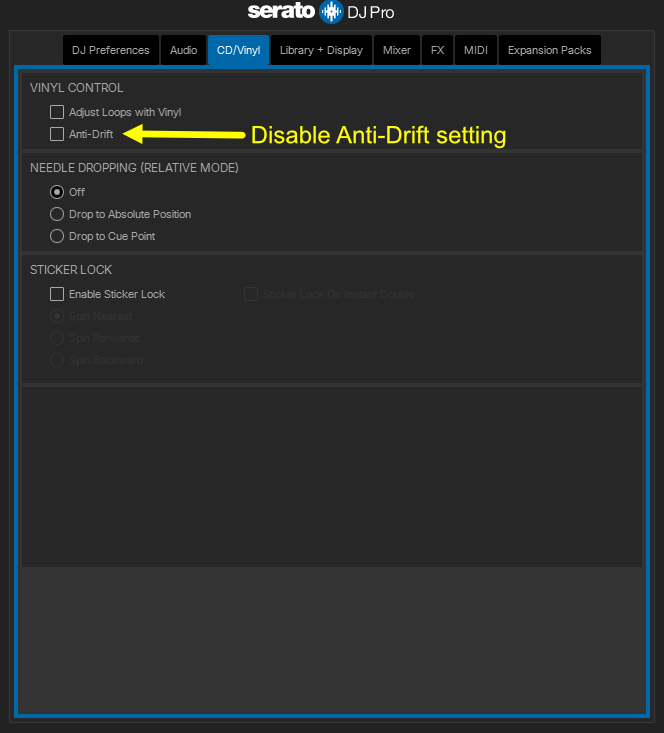
if you let platters turn without interacting with platters and vinyl discs, you can enable Serato DJ Pro anti-drift setting.
What may cause drifting with Serato DJ Pro when scratching or beat juggling?
Make sure you have disabled Serato DJ Setting > CD/ Vinyl > Anti-Drift, as it causes drift when scratching and beat-juggling.
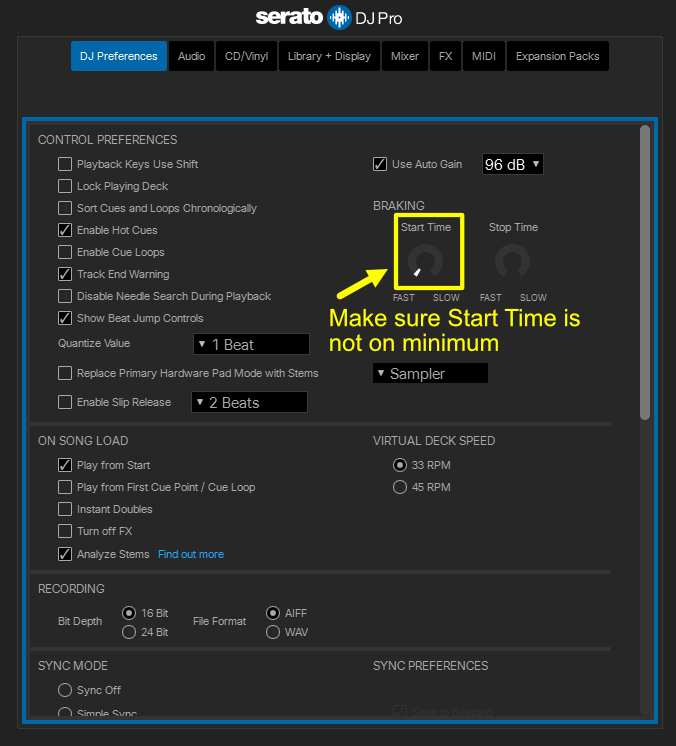
Another Serato DJ Pro setting which may cause drift is Instant Start: in Serato DJ Preferences, you can set a start time: never set it on minimum on a motorized platter if you scratch or beat juggle, otherwise the platter may drift.
What shoud I do if a platter drift?
If a platter drifts:
Make sure you disable Serato > Setting > CD/Vinyl > Anti-Drift option,
Check your vinyl disks are not excessively warped and the central hole for the spindle is not damaged,
Make sure the slipmats are under the disks, and make sure DJControl T10 is used on a flat surface,
(1) Place the slipmats and discs on both platters
(2) close the DJ app, switch off DJControl T10
(3) Push down Preparation + Back keys on deck 2 and keep the 2 keys down
(4) Switch on DJControl T10 power with Power Switch key
(5) When the platters start rotating, release the Preparation + Back keys of deck 2
(6) Let the platters rotate until they stop
(7) If pads 1 to 4 on both decks are green, the platter calibration was a success, if pads 1 to 4 are red, the calibration has failed
5.3. Backspin
What should I do if I find the backspin is not long enough?
If you like long backspins, you may:
check if turning the vinyl disc upside down makes backspin longer (vinyl discs tend to warp, 1 side slips more than the other)
change the position of the slipsheet: instead of the usual position platter->slipsheet-> slipmat>vinyl disc, you may try the position platter->slipmat->slipsheet-> vinyl disc
5.4. Instant Start
Why does Serato play a short sound if I push play while I block the vinyl disc rotation?
Playing a short sound while the vinyl disc is blocked means the start time is set on 0 on Serato > Setting > DJ Preferences.
To use a motorised DJ controller as a turntable DJ set up, you should never set the start time at 0 (=Instant Start), but you should always set a small start time as on the image.
5.5. Switch platters off
Can I use DJControl T10 as non-motorized DJ controller, in playing tracks while platters to not turn?
Serato DJ Pro and DJUCED Pro do not include a mode where platters do not turn. This mode is available in another DJ app.